
HP ProLiant DL585 Generation 5 Server Maintenance and Service Guide

Removal and replacement procedures 53
6.
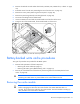
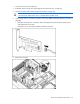
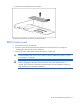
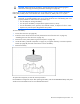
Remove the cache module from the controller.
To replace the component, reverse the removal procedure.
BBWC battery pack
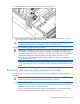
1. Power down the server (on page 26).
2. Extend or remove the server from the rack ("Remove the server from the rack" on page 28,
"Extending the server from the rack" on page 27).
3. Remove the access panel ("Removing the access panel" on page 28).
CAUTION: To prevent a server malfunction or damage to the equipment, do not add or
remove the battery pack while an array capacity expansion, RAID level migration, or stripe
size migration is in progress.
CAUTION: After the server is powered down, wait 15 seconds and then check the amber LED
before unplugging the cable from the cache module. If the amber LED blinks after 15
seconds, do not remove the cable from the cache module. The cache module is backing up
data, and data is lost if the cable is detached.