
HP ProLiant DL585 Generation 5 Server Maintenance and Service Guide

Removal and replacement procedures 46
immediate power loss.
CAUTION: To prevent improper cooling and thermal damage, do not operate the server
unless all bays are populated with either a component or a blank.
NOTE: Refer to the section "Power supply LEDs ("Hot-plug power supply LEDs" on page 74)"
for information on the current status of the hot-plug power supply.
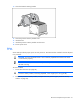
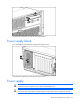
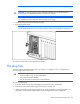
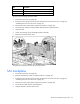
1. Disconnect the power cord from the power supply.
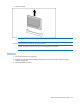
2. Remove the power supply.
NOTE: To remove the primary hot-plug power supply, remove the shipping screw under the
power supply handle. Use the T-15 Torx screwdriver ("Rear panel components" on page 73).
To replace the component, reverse the removal procedure.
Hot-plug fans
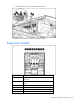
The server supports redundant hot-plug fans ("Fan locations" on page 81) in a 5+1 configuration to
provide proper airflow to the server.
WARNING: To prevent personal injury from hazardous energy:
• Remove watches, rings, or other metal objects.
• Use tools with insulated handles.
• Do not place tools or metal parts on top of batteries.
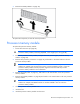
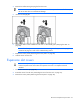
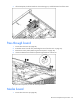
To replace a hot-plug fan:
1. Extend the server from the rack ("Extending the server from the rack" on page 27).
2. Remove the access panel ("Removing the access panel" on page 28).
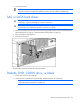
3. Identify the failed fan by locating an amber LED on top of the failed fan ("Hot-plug fan LEDs" on
page 82) or on the Systems Insight Display ("Systems Insight Display LEDs" on page 78).