
HP ProLiant DL585 Generation 5 Server Maintenance and Service Guide

Removal and replacement procedures 29
3.
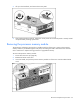
Lift up on the hood latch, and remove the access panel.
4. After installing hardware options, replace the access panel. Be sure that the panel is securely locked
into place before powering up the server.
Removing the processor memory module
The processors and memory are stored in a module at the front of the server. Access to the processor
memory module is provided through the front panel, eliminating the need to extend the server from the
rack to install new or replace existing processors or upgrade the memory.
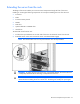
To remove the processor memory module:
1. Power down the server (on page 26).
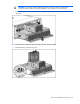
2. Release the latches on the lever.
3. Lower the handle, and pull the processor memory module out of the server until the release latches
catch.