
XenServer Software Development Kit Guide 4.1.0


Using the API
23
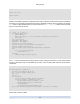
# Check if there's a VM by the uuid specified
${XE} vm-list params=uuid | grep -q " ${vmuuid}$"
if [ $? -ne 0 ]; then
echo "error: no vm uuid \"${vmuuid}\" found"
exit 2
fi
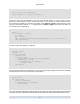
The script then checks the power state of the VM and if it is running, it attempts a clean shutdown. The
event system is used to wait for the VM to enter state "Halted".
Note
The XE CLI supports a command-line argument --minimal which causes it to print its output
without excess whitespace or formatting, ideal for use from scripts. If multiple values are returned
they are comma-separated.
# Check the power state of the vm
name=$(${XE} vm-list uuid=${vmuuid} params=name-label --minimal)
state=$(${XE} vm-list uuid=${vmuuid} params=power-state --minimal)
wasrunning=0
# If the VM state is running, we shutdown the vm first
if [ "${state}" = "running" ]; then
${XE} vm-shutdown uuid=${vmuuid}
${XE} event-wait class=vm power-state=halted uuid=${vmuuid}
wasrunning=1
fi
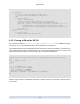
The VM is then cloned and the new VM has its name_label set to cloned_vm.
# Clone the VM
newuuid=$(${XE} vm-clone uuid=${vmuuid} new-name-label=cloned_vm)
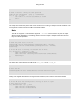
Finally, if the original VM had been running and was shutdown, both it and the new VM are started.
# If the VM state was running before cloning, we start it again
# along with the new VM.
if [ "$wasrunning" -eq 1 ]; then
${XE} vm-start uuid=${vmuuid}
${XE} vm-start uuid=${newuuid}
fi