
XenServer Software Development Kit Guide 4.1.0



Overview of the XenServer API
11
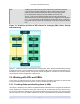
Figure 3.2. A VM object with 2 associated VDIs
For expository purposes, Figure 3.2, “A VM object with 2 associated VDIs” presents a graphical example
that shows the relationship between VMs, VBDs, VDIs and SRs. In this instance a VM object has 2 attached
VDIs: there are 2 VBD objects that form the connections between the VM object and its VDIs; and the VDIs
reside within the same SR.
3.3.1.3. Hotplugging the VBD
If we rebooted the VM at this stage then, after rebooting, the block device corresponding to the VBD would
appear: on boot, XenServer queries all VBDs of a VM and actively attaches each of the corresponding VDIs.
Rebooting the VM is all very well, but recall that we wanted to attach a newly created blank disk to a
running VM. This can be achieved by invoking the plug method on the newly created VBD object. When
the plug call returns successfully, the block device to which the VBD relates will have appeared inside the
running VM -- i.e. from the perspective of the running VM, the guest operating system is lead to believe
that a new disk device has just been hot plugged. Mirroring this fact in the managed world of the API, the
currently_attached field of the VBD is set to true.
Unsurprisingly, the VBD plug method has a dual called "unplug". Invoking the unplug method on a
VBD object causes the associated block device to be hot unplugged from a running VM, setting the
currently_attached field of the VBD object to false accordingly.
3.3.2. Creating and attaching Network Devices to VMs
The API calls involved in configuring virtual network interfaces in VMs are similar in many respects to the
calls involved in configuring virtual disk devices. For this reason we will not run through a full example of
how one can create network interfaces using the API object-model; instead we will use this section just to
outline briefly the symmetry between virtual networking device and virtual storage device configuration.
The networking analogue of the VBD class is the VIF class. Just as a VBD is the API representation of a
block device inside a VM, a VIF (Virtual Network Device) is the API representation of a network device inside
a VM. Whereas VBDs associate VM objects with VDI objects, VIFs associate VM objects with Network
objects. Just like VBDs, VIFs have a currently_attached field that determines whether or not the network
device (inside the guest) associated with the VIF is currently active or not. And as we saw with VBDs, at
VM boot-time the VIFs of the VM are queried and a corresponding network device for each created inside
the booting VM. Similarly, VIFs also have plug and unplug methods for hot plugging/unplugging network
devices in/out of running VMs.
3.3.3. Host configuration for networking and storage
We have seen that the VBD and VIF classes are used to manage configuration of block devices and network
devices (respectively) inside VMs. To manage host configuration of storage and networking there are two
analogous classes: PBD (Physical Block Device) and PIF (Physical [network] InterFace).