
ProLiant DL580 Generation 5 Maintenance and Service Guide

Removal and replacement procedures 27
IMPORTANT: If installing a hot-plug device, it is not necessary to power down the server.
1. Shut down the OS as directed by the OS documentation.
2. Press the Power On/Standby button to place the server in standby mode. When the server enters
standby power mode, the system power LED changes to amber.
3. Disconnect the power cords.
The system is now without power.
Extending the server from the rack
The design of the server enables you to access several components through the front of the server. You do
not need to extend the server from the rack to install or access the following components:
• Processors
• PPMs
• Memory
• Processor memory module
• Hard drives
WARNING: To reduce the risk of personal injury or equipment damage, be sure that the rack
is adequately stabilized before extending a component from the rack.
WARNING: To reduce the risk of personal injury, be careful when pressing the server rail-
release latches and sliding the server into the rack. The sliding rails could pinch your fingers.
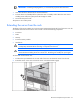
To extend the server from the rack:
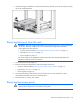
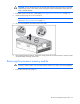
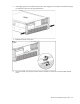
1. Pull down the quick-release levers on each side of the server to release the server from the rack.
2. Extend the server on the rack rails until the server rail-release latches engage.