
ProLiant DL580 Generation 3 Server Maintenance and Service Guide
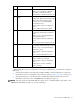
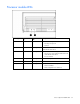
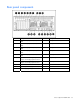
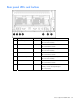
Table Of Contents
- HP ProLiant DL580 Generation 3 Server Maintenance and Service Guide
- Notice
- Contents
- Illustrated parts catalog
- Removal and replacement procedures
- Required tools
- Safety considerations
- Preparation procedures
- Removing the front bezel
- Removing a media drive blank
- Removing a media drive
- Removing the processor module
- Removing a processor
- Removing a PPM
- Removing a PCI latch
- Removing a PCI retaining clip
- Removing the PCI-X Hot Plug basket
- Removing a non-hot-plug expansion board
- Removing the PCI-X Hot Plug mezzanine option
- Removing the PCI Express mezzanine option
- Recovering data from the BBWC
- Removing the BBWC battery pack
- Removing the BBWC cache module
- Removing the system board
- Removing the system battery
- Removing the media board
- Removing the SCSI backplane
- Removing the power backplane
- Removing the memory backplane
- Removing a hard drive blank
- Removing a hot-plug SCSI hard drive
- Removing a hot-plug SAS hard drive
- Removing the SAS-SATA hard drive cage
- Removing the SAS-SATA backplane
- Removing a PCI-X Hot Plug expansion board
- Removing a power supply blank
- Removing a redundant hot-plug power supply
- Replacing hot-plug fans
- Memory overview
- Diagnostic tools
- SmartStart software
- SmartStart Scripting Toolkit
- HP Instant Support Enterprise Edition
- Option ROM Configuration for Arrays
- HP ROM-Based Setup Utility
- ROMPaq utility
- System Online ROM flash component utility
- Integrated Management Log
- Integrated Lights-Out technology
- Automatic Server Recovery
- HP Systems Insight Manager
- HP Insight Diagnostics
- USB support
- Troubleshooting the system using port 85 codes
- Server component identification
- Front panel components
- Front panel LEDs and buttons
- Memory board components and LEDs
- Processor module LEDs
- Rear panel components
- Rear panel LEDs and buttons
- Power supply LEDs
- System board components
- DIMM slot locations
- SCSI IDs
- Hot-plug SCSI hard drive LEDs
- Hot-plug SCSI hard drive LED combinations
- SATA or SAS IDs
- SATA or SAS hard drive LEDs
- SAS and SATA hard drive LED combinations
- Fan locations
- Hot-plug fan LEDs
- BBWC LEDs
- Server cabling
- Specifications
- Acronyms and abbreviations
- Index
Server component identification 71
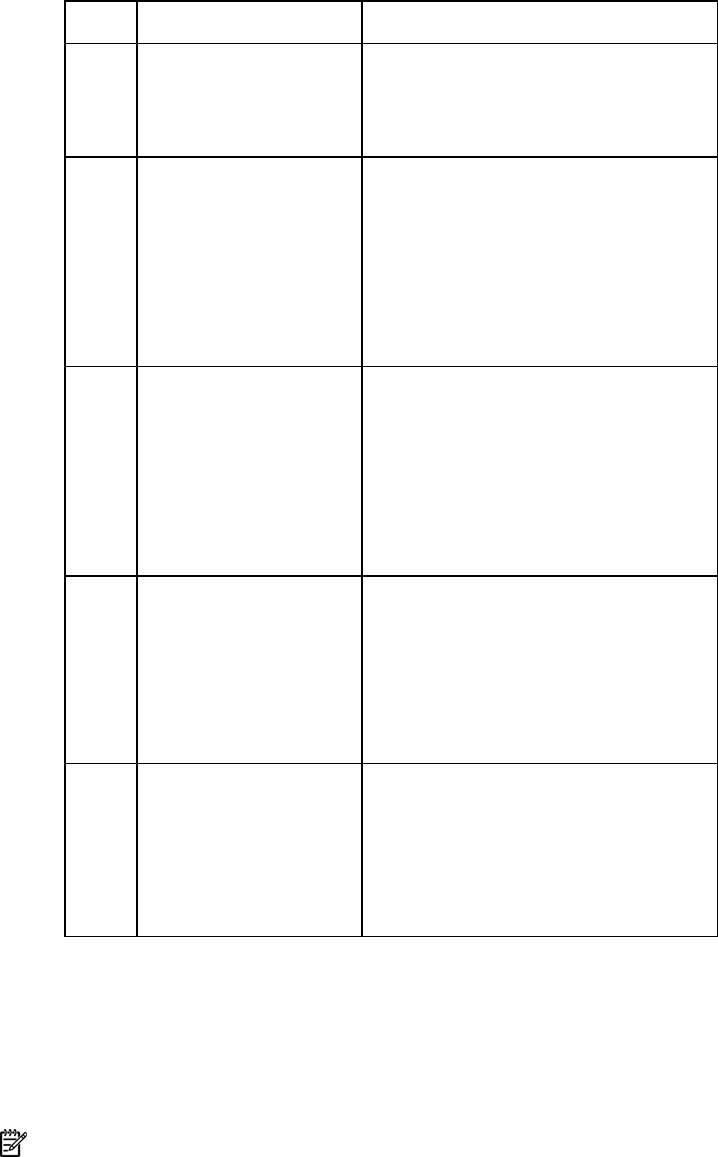
Item Description Status
5 DIMM LEDs (1–4) Off = Normal or DIMM not installed
Amber = Uncorrectable error detected or
correctable error threshold reached
Flashing amber = DIMM configuration error
6 Spare
Off = Board not online or board not
configured for Online Spare Memory mode
Amber = Correctable error threshold
reached; server is in degraded Online
Spare Memory mode
Flashing amber = Memory configuration
error*
Green = Online Spare Memory mode
7 Mirrored
Off = Board not online or board not
configured for Hot-Plug Mirrored Memory
mode
Amber = Server is in degraded Hot-Plug
Mirrored Memory mode
Flashing amber = Memory configuration
error*
Green = Hot-Plug Mirrored Memory mode
8 RAID
Off = Board not online or board not
configured for Hot-Plug RAID Memory mode
Amber = Server is in degraded Hot-Plug
RAID Memory mode
Flashing amber = Memory configuration
error*
Green = Hot-Plug RAID Memory mode
9 Board Off = Power off or locking switch unlocked
Amber = Memory error detected
Flashing amber = Memory configuration
error*
Flashing green = Board is rebuilding
Green = Normal
* AMP configuration errors occur when the current memory configuration is not valid for the configured
AMP mode:
• If the mode selected is the desired mode, modify the DIMM or board configuration to support the
desired mode. For more information, refer to "Memory options ("Memory overview" on page 50)."
• If the mode selected is not the desired mode, run RBSU and change the AMP mode. For more
information, refer to the section "HP ROM-Based Setup Utility (on page 61)."
NOTE: If the Spare, Mirrored, and RAID LEDs are off, the server is in Advanced ECC mode. Refer to "HP
ROM-Based Setup Utility (on page 61)" for more information.