
ProLiant DL580 Generation 3 Server Maintenance and Service Guide
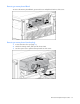
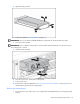
Table Of Contents
- HP ProLiant DL580 Generation 3 Server Maintenance and Service Guide
- Notice
- Contents
- Illustrated parts catalog
- Removal and replacement procedures
- Required tools
- Safety considerations
- Preparation procedures
- Removing the front bezel
- Removing a media drive blank
- Removing a media drive
- Removing the processor module
- Removing a processor
- Removing a PPM
- Removing a PCI latch
- Removing a PCI retaining clip
- Removing the PCI-X Hot Plug basket
- Removing a non-hot-plug expansion board
- Removing the PCI-X Hot Plug mezzanine option
- Removing the PCI Express mezzanine option
- Recovering data from the BBWC
- Removing the BBWC battery pack
- Removing the BBWC cache module
- Removing the system board
- Removing the system battery
- Removing the media board
- Removing the SCSI backplane
- Removing the power backplane
- Removing the memory backplane
- Removing a hard drive blank
- Removing a hot-plug SCSI hard drive
- Removing a hot-plug SAS hard drive
- Removing the SAS-SATA hard drive cage
- Removing the SAS-SATA backplane
- Removing a PCI-X Hot Plug expansion board
- Removing a power supply blank
- Removing a redundant hot-plug power supply
- Replacing hot-plug fans
- Memory overview
- Diagnostic tools
- SmartStart software
- SmartStart Scripting Toolkit
- HP Instant Support Enterprise Edition
- Option ROM Configuration for Arrays
- HP ROM-Based Setup Utility
- ROMPaq utility
- System Online ROM flash component utility
- Integrated Management Log
- Integrated Lights-Out technology
- Automatic Server Recovery
- HP Systems Insight Manager
- HP Insight Diagnostics
- USB support
- Troubleshooting the system using port 85 codes
- Server component identification
- Front panel components
- Front panel LEDs and buttons
- Memory board components and LEDs
- Processor module LEDs
- Rear panel components
- Rear panel LEDs and buttons
- Power supply LEDs
- System board components
- DIMM slot locations
- SCSI IDs
- Hot-plug SCSI hard drive LEDs
- Hot-plug SCSI hard drive LED combinations
- SATA or SAS IDs
- SATA or SAS hard drive LEDs
- SAS and SATA hard drive LED combinations
- Fan locations
- Hot-plug fan LEDs
- BBWC LEDs
- Server cabling
- Specifications
- Acronyms and abbreviations
- Index

Removal and replacement procedures 56
5.
Press the Escape key twice to go back to the main RBSU menu.
6. Press the F10 key, when prompted, to exit RBSU. The server reboots and tests all memory in the
system.
IMPORTANT: To reconfigure the memory mode after initial setup, you must reboot the system, enter RBSU,
and select an AMP mode.
Memory boards and DIMMs
Memory board and DIMM removal and replacement procedures can be either hot-replace or non-hot-
plug, depending on how the server is configured. Hot-replace enables failed or degraded DIMMs to be
replaced while the server is running, and has no operating system requirements.
When the server is configured for hot-plug mirrored memory or hot-plug RAID memory, you can perform a
hot-replacement procedure without powering down the server or experiencing server downtime:
1. Remove a memory board ("Removing a memory board" on page 58, "Removing a memory board
(non-hot-plug)" on page 57).
2. Replace failed or degraded DIMMs ("Removing DIMMs" on page 59).
3. Reinstall the memory board in the slot from which it was removed.
The replacement procedures in this section apply to both hot-replace and non-hot-plug memory
procedures, except as noted.
IMPORTANT: Be sure to power down the server when performing board removal procedures in a server
that is not configured for Advanced ECC, hot-plug mirrored memory, or hot-plug RAID memory.
Observe the following warnings when performing a hot-plug replacement procedure.
WARNING: Always comply with all electrostatic and thermal guidelines to prevent bodily
injury and ensure a properly functioning system when performing hot-plug operations.
WARNING: To prevent personal injury from hazardous energy:
• Remove watches, rings, or other metal objects.
• Use tools with insulated handles.
• Do not place tools or metal parts on top of batteries.