
ProLiant DL580 Generation 3 Server Maintenance and Service Guide
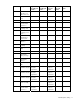
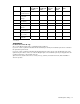
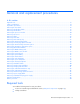
Table Of Contents
- HP ProLiant DL580 Generation 3 Server Maintenance and Service Guide
- Notice
- Contents
- Illustrated parts catalog
- Removal and replacement procedures
- Required tools
- Safety considerations
- Preparation procedures
- Removing the front bezel
- Removing a media drive blank
- Removing a media drive
- Removing the processor module
- Removing a processor
- Removing a PPM
- Removing a PCI latch
- Removing a PCI retaining clip
- Removing the PCI-X Hot Plug basket
- Removing a non-hot-plug expansion board
- Removing the PCI-X Hot Plug mezzanine option
- Removing the PCI Express mezzanine option
- Recovering data from the BBWC
- Removing the BBWC battery pack
- Removing the BBWC cache module
- Removing the system board
- Removing the system battery
- Removing the media board
- Removing the SCSI backplane
- Removing the power backplane
- Removing the memory backplane
- Removing a hard drive blank
- Removing a hot-plug SCSI hard drive
- Removing a hot-plug SAS hard drive
- Removing the SAS-SATA hard drive cage
- Removing the SAS-SATA backplane
- Removing a PCI-X Hot Plug expansion board
- Removing a power supply blank
- Removing a redundant hot-plug power supply
- Replacing hot-plug fans
- Memory overview
- Diagnostic tools
- SmartStart software
- SmartStart Scripting Toolkit
- HP Instant Support Enterprise Edition
- Option ROM Configuration for Arrays
- HP ROM-Based Setup Utility
- ROMPaq utility
- System Online ROM flash component utility
- Integrated Management Log
- Integrated Lights-Out technology
- Automatic Server Recovery
- HP Systems Insight Manager
- HP Insight Diagnostics
- USB support
- Troubleshooting the system using port 85 codes
- Server component identification
- Front panel components
- Front panel LEDs and buttons
- Memory board components and LEDs
- Processor module LEDs
- Rear panel components
- Rear panel LEDs and buttons
- Power supply LEDs
- System board components
- DIMM slot locations
- SCSI IDs
- Hot-plug SCSI hard drive LEDs
- Hot-plug SCSI hard drive LED combinations
- SATA or SAS IDs
- SATA or SAS hard drive LEDs
- SAS and SATA hard drive LED combinations
- Fan locations
- Hot-plug fan LEDs
- BBWC LEDs
- Server cabling
- Specifications
- Acronyms and abbreviations
- Index

Illustrated parts catalog 11
Item Description
Original
assembly part
number
Modified
assembly part
number
Original
spare part
number
Modified
spare part
number
Customer self
repair
—
g) Intel® 3.00-
GHz Xeon™ 2
MBx2 dual core*
399755-001 — 399955-001 — Yes
19
Processor blanks
(two)
392523-001 — 406056-001 — Yes
— Cables — — — — —
20
Cable kit, data,
ProLiant DL580
G3 Server *
— — 376478-001 — Yes
—
a) Cable
assembly, USB
346187-001 — — — Yes
—
b) Cable
assembly, power
switch
367602-001 — — — Yes
—
c) Cable assembly,
PCI-X Hot Plug
switch board
224999-003 — — — Yes
21
SAS hard drive
cable kit *
— — 393535-001 — Yes
—
a) SAS cable
assembly
361316-002 — — — Yes
—
b) SAS power
cable
379196-001 — — — Yes
— Options — — — — —
22
Battery-Backed
Write Cache
battery housing *
338173-001 — 349989-001 — Yes
23
Battery-Backed
Write Cache
battery *
274779-001 — 307132-001 — Yes
24
Cache board, 128
MB *
012304-001 — 351518-001 — Yes
25
PCI Express x4
mezzanine board
*
012450-
001‡ See
requirement
012450-501
376473-
001‡ See
requirement
411792-001 Yes
26
PCI Express x8
mezzanine board
*
012743-
001‡ See
requirement
012743-501
390347-
001‡ See
requirement
411793-001 Yes
27
PCI-X Hot Plug
mezzanine board
*
012447-
001‡ See
requirement
012447-501
376472-
001‡ See
requirement
411791-001 Yes
28
PCI-X Hot Plug
basket assembly *
375192-001 —
393784-
001‡ See
requirement
— Yes
29
SAS backplane,
ProLiant DL580
G3 Server *
012564-
001‡ See
requirement
012564-501
376475-
001‡ See
requirement
411794-001 Yes