
power distribution solutions for the ProLiant DL580 G2 server

power distribution solutions for the ProLiant DL580 G2 server
To use the Rack/Site Preparation utility:
1. Select either the “Express” or “Advanced” mode of calculation. Express calculation
uses pre-set values for components and can be used for producing a quick estimate
of system requirements. Advanced calculation requires user to configure individual
components and is recommended for final installation planning. If “Express” mode
is selected, then proceed to step 5.
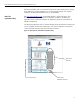
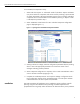
2. Select “DL580G2” tab at bottom of screen. Individual component configuration
page is displayed Figure 11).
figure 11. Opening Screen of Individual Component Calculator
3. Starting with the line voltage, select the configuration parameters desired, scrolling
down to ensure all appropriate parameters are chosen. Be aware of error
messages indicating possible problems.
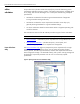
4. When component configuration is complete, click on “Rack Site Installation” tab to
return to the main calculator page (Figure 10).
5. Complete the “Load Requirements” and “Input Line Voltage” configuration areas.
Each configuration change will be calculated instantly. The rack space indicator
indicates the amount of vertical space used/available.
conclusion
The load requirements of high-density server installations can be significant. Careful
planning using accurate calculations and providing overhead compensation for
peripheral devices can greatly reduce the chances for downtime due to power problems.
15