
ProLiant DL580 Setup and Installation Guide



3-2 Compaq ProLiant DL580 Server Setup and Installation Guide
Compaq Confidential – Need to Know Required
Writer: Cynthia Dresden Project: Compaq ProLiant DL580 Server Setup and Installation Guide Comments:
Part Number: 159213-003 File Name: d-ch3 Integrated Smart Array Controller.doc Last Saved On: 4/18/01 10:55 AM
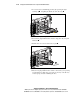
External SCSI Connector
SCSI port 2 controls external SCSI tape devices through a connector on the
rear panel of the server. SCSI port 1 is dedicated to controlling the SCSI drives
in the internal drive bays.
654321
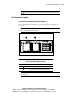
Figure 3-1. External SCSI connector on the rear panel
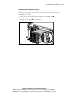
To use a different Smart Array SCSI controller for managing internal hard
drives, refer to the Compaq Integrated Smart Array Controller User Guide for
information about installing a Smart Array/SCSI controller interface
assemblies.
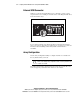
Array Configuration
Use the Array Configuration Utility to configure internal server hardware in
the way that best suits your needs.
CAUTION: Back up all data before migrating a drive from a nonintelligent
controller to an intelligent array configuration. Failure to back up data will result
in complete loss of data.
For additional information about the Integrated Smart Array Controller, refer
to the Compaq Integrated Smart Array Controller User Guide.