
ProLiant DL580 Setup and Installation Guide

Installing Hardware Options 2-23
Compaq Confidential – Need to Know Required
Writer: Cynthia Dresden Project: Compaq ProLiant DL580 Server Setup and Installation Guide Comments:
Part Number: 159213-003 File Name: c-ch2 Installing Hardware Options.doc Last Saved On: 4/9/01 5:07 PM
1. Identify the auxiliary serial connector from the parts that shipped with
your server.
2. Identify the auxiliary serial knockout available for installing the
auxiliary serial connector on the rear of the server.
3. Follow the procedures for “Powering Down the Server” and “Removing
the Access Panel” described earlier in this chapter.
4. Remove the retaining screw from the auxiliary serial knockout, and
remove the knockout.
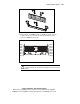
5. Place the external serial connector into the rear panel and secure the
connector with the two screwlocks that ship with the connector.
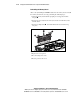
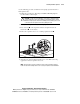
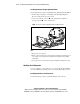
6. Connect the internal serial connector to serial port B on the peripheral
board.
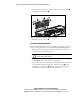
Figure 2-16. Cabling the auxiliary serial connector
7. Replace the access panel. Connect your external serial device to the
auxiliary serial connector.
8. Power up your server.
9. Run the System Configuration Utility to enable the auxiliary serial port.
Auxiliary SCSI Cable
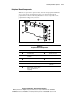
You can configure a second external SCSI device directly to the standard SCSI
controller on your peripheral board by purchasing an auxiliary SCSI cable. To
install this option from SCSI port 1 to a SCSI blank panel on the rear of your