
ProLiant DL580 Setup and Installation Guide

2-22 Compaq ProLiant DL580 Server Setup and Installation Guide
Compaq Confidential – Need to Know Required
Writer: Cynthia Dresden Project: Compaq ProLiant DL580 Server Setup and Installation Guide Comments:
Part Number: 159213-003 File Name: c-ch2 Installing Hardware Options.doc Last Saved On: 4/9/01 5:07 PM
Installing the Remote Insight Lights-Out Edition
Use the following procedure to install the Remote Insight Lights-Out Edition:
1. Perform Steps 1 through 7 of “Installing a Non-Hot-Plug Expansion
Board” described in the previous section.
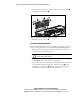
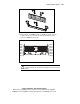
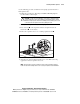
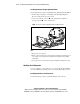
2. Connect the four-pin connector on the peripheral board with the
four-pin connector
on the system board.
NOTE: The connector cable is included in the Remote Insight option kit.
2
1
Figure 2-15. Connecting the Remote Insight Lights-Out Edition to the system
board
3. Replace the access panel.
4. Refer to the Compaq Remote Insight Lights-Out Edition Installation and
User Guide in your option kit for additional configuration and cabling
information.
5. Power up the server and run the System Configuration Utility, if needed.
Auxiliary Serial Connector
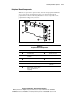
You can configure a second serial device to your Compaq ProLiant DL580
server by installing the auxiliary serial connector that ships with your server.
Installing the Auxiliary Serial Connector
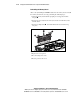
Use the following procedure to install the auxiliary serial connector: