
ProLiant DL580 Setup and Installation Guide

Installing Hardware Options 2-21
Compaq Confidential – Need to Know Required
Writer: Cynthia Dresden Project: Compaq ProLiant DL580 Server Setup and Installation Guide Comments:
Part Number: 159213-003 File Name: c-ch2 Installing Hardware Options.doc Last Saved On: 4/9/01 5:07 PM
Remote Insight Lights-Out Edition
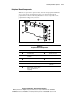
Remote Insight Lights-Out Edition is a PCI-based, single-board computer that
contains a built-in processor and fully supports keyboard, mouse, and PCI
video functions. With the Remote Insight Lights-Out Edition installed in the
Compaq ProLiant DL580 server, you can use a standard web browser and
Compaq Insight Manager to access and remotely manage your server from any
console on the network, regardless of the state of the host operating system.
Using a standard web browser launched through Compaq Insight Manager,
with the Remote Insight Lights-Out Edition, you can do the following:
■ Remotely access the console of the host server, including all text mode
and graphics mode screens with full keyboard and mouse controls
■ Remotely power on, power off, or reboot the host server
■ Remotely boot the host server from a diskette drive installed in a
network client
■ Access the Compaq Insight Management Agents on a host server
through the Remote Insight Lights-Out Edition
■ Receive alerts from the Remote Insight Lights-Out Edition, regardless
of the state of the host server operating system
■ Access advanced troubleshooting features provided by Remote Insight
Lights-Out Edition
■ Launch a web browser, use Simple Network Management Protocol
(SNMP) alerting, and manage the Remote Insight Lights-Out Edition
using Compaq Insight Manager
For more detailed information on installing the Remote Insight Lights-Out
Edition, refer to the Compaq website:
www.compaq.com/manage/15minslideshow/
IMPORTANT: Ensure that you install the Remote Insight Lights-Out Edition in slot 6, the
32-bit expansion slot. Do not install the Remote Insight Lights-Out Edition in a 64-bit slot.