
ProLiant DL580 Setup and Installation Guide

Installing Hardware Options 2-17
Compaq Confidential – Need to Know Required
Writer: Cynthia Dresden Project: Compaq ProLiant DL580 Server Setup and Installation Guide Comments:
Part Number: 159213-003 File Name: c-ch2 Installing Hardware Options.doc Last Saved On: 4/9/01 5:07 PM
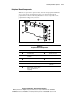
Peripheral Board Components
With the exception of the expansion slots, all of the Compaq ProLiant DL580
server’s data storage and transmission devices are managed through the
peripheral board. Use the following illustration to locate components on the
peripheral board shipped in your server.
6
3
4
1
11
10
9
8
7
5
2
Figure 2-12. Peripheral board components
Table 2-4
Peripheral Board Components
Item Component Item Component
Internal battery Parallel connector
Integrated Smart Array
Controller
Video connector
SCSI port 1 Serial connector A
SCSI port 2 (reserved) Mouse connector
Serial connector B (auxiliary) Hot-plug keyboard
connector
External SCSI connector (tape
device only, libraries not
supported)