
ProLiant DL580 Setup and Installation Guide

2-16 Compaq ProLiant DL580 Server Setup and Installation Guide
Compaq Confidential – Need to Know Required
Writer: Cynthia Dresden Project: Compaq ProLiant DL580 Server Setup and Installation Guide Comments:
Part Number: 159213-003 File Name: c-ch2 Installing Hardware Options.doc Last Saved On: 4/9/01 5:07 PM
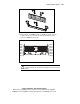
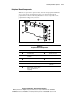
Reinstalling the Memory Board
After securely installing the DIMM modules into the memory board, reinstall
the memory board in the server by performing the following steps:
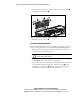
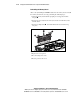
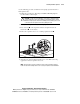
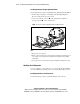
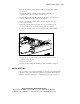
1. Align the memory board with the upright grooved supports and slide
into place
.
2. Press the board evenly into the memory board slot to make firm contact
with the board.
3. Press the locking latches down until the lateral release latches snap
into place.
2
2
1
Figure 2-11. Installing the memory board
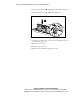
4. Replace the access panel.
5. Reconnect all power cords.
6. Restore power to the server.