
ProLiant DL580 Setup and Installation Guide


2-10 Compaq ProLiant DL580 Server Setup and Installation Guide
Compaq Confidential – Need to Know Required
Writer: Cynthia Dresden Project: Compaq ProLiant DL580 Server Setup and Installation Guide Comments:
Part Number: 159213-003 File Name: c-ch2 Installing Hardware Options.doc Last Saved On: 4/9/01 5:07 PM
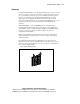
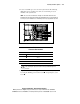
7. Pull the blank out of its slot and retain it for future use.
1
2
2
3
Figure 2-5. Removing the blanking panel from the processor slot
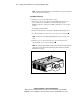
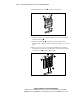
8. Align the new processor module with the processor slot and push the
module into the slot
.
9. Press the ejector paddles down at the same time. This motion
simultaneously seats the board into the slot and locks the processor into
place.
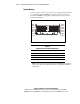
10. When ejectors are seated, complete the installation by pressing the
spring-mounted retention screw until it stays down. Continue rotating
the retention screw
until it is finger-tight.
1
2
2
3
Figure 2-6. Inserting the processor into the processor slot