
ProLiant DL580 Setup and Installation Guide


Installing Hardware Options 2-7
Compaq Confidential – Need to Know Required
Writer: Cynthia Dresden Project: Compaq ProLiant DL580 Server Setup and Installation Guide Comments:
Part Number: 159213-003 File Name: c-ch2 Installing Hardware Options.doc Last Saved On: 4/9/01 5:07 PM
Processors
Compaq ProLiant DL580 servers ship standard with at least one processor and
processor connectors on the server board that accommodate as many as four
processors. When more than one processor is installed, both must operate at
the same speed and frequency. Compaq ProLiant DL580 servers do not
support processor configurations with mixed frequencies. If you install
processors of mixed frequencies in your Compaq ProLiant DL580 server, you
risk adversely affecting your system performance and nullifying your
warranty.
Intel Pentium III processors of 850-MHz frequency and higher feature
internally locked switch settings that override the processor configuration
switch (SW4) on your system board. When installing an 850-MHz or higher
processor, you need not change any switch settings on the processor
configuration switch (SW4).
Refer to the installation documentation that ships with your option kit for
detailed information regarding your processors, or contact your Compaq
authorized reseller.
For additional information about configuring your system for processor
upgrades, refer to the system configuration label on the inside of the access
panel, or to the Compaq maintenance and service guides for your ProLiant
server on the Compaq website:
www.compaq.com/support/servers
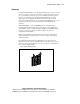
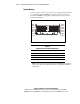
Figure 2-2. Pentium III Xeon processor for Compaq ProLiant DL580 servers