
ProLiant DL580 Setup and Installation Guide

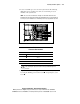
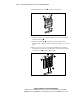
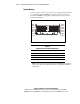

2-6 Compaq ProLiant DL580 Server Setup and Installation Guide
Compaq Confidential – Need to Know Required
Writer: Cynthia Dresden Project: Compaq ProLiant DL580 Server Setup and Installation Guide Comments:
Part Number: 159213-003 File Name: c-ch2 Installing Hardware Options.doc Last Saved On: 4/9/01 5:07 PM
IMPORTANT: The system power in the Compaq ProLiant DL580 server does not shut off
completely from the front panel Power On/Standby switch. The two positions of the switch
function as On and Standby, rather than On and Off. The Standby position removes power
from most of the electronics and the drives; however, portions of the power supply and
some internal circuitry remains active.
To remove all power from the system, it is necessary to disconnect the power cord from
the server. In systems with multiple power supplies, disconnect all the power cords to
remove power from the system.
NOTE: After setting the Power On/Standby switch to Standby, it may take the operating
system up to 30 seconds before shutting down the power.
5. Disconnect all power cords once the system shuts down. See Chapter 4,
“Installing the Server,” for additional information.
6. Disconnect any other external equipment connected to the computer.