
ProLiant DL580 Setup and Installation Guide
1-12 Compaq ProLiant DL580 Server Setup and Installation Guide
Compaq Confidential – Need to Know Required
Writer: Cynthia Dresden Project: Compaq ProLiant DL580 Server Setup and Installation Guide Comments:
Part Number: 159213-003 File Name: b-ch1 Server Features.doc Last Saved On: 4/9/01 5:05 PM
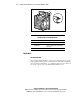
Network Interface Controller (NIC)
Features
Compaq ProLiant DL580 servers include a Compaq NC3134 Fast Ethernet
64-bit Dual-Port 10/100 network interface controller (NIC) installed in PCI
Hot Plug slot five. Features of the controller include:
■ Two RJ-45 connectors for 10BaseT or 100 TX Ethernet
■ PCI Hot Plug support
■ Adapter Fault Tolerance (AFT)
■ Adaptive Load Balancing (ALB)
■ Fast Etherchannel support
■ Full-duplex Ethernet support for up to 20 or 200 Mb/s aggregate
bandwidth per port
■ Support for the optional Compaq NC6132 1000 SX Upgrade Module for
an industry-standard upgrade to Gigabit Ethernet
■ Software support for one dual-port, two dual-port, or two single-port
redundant NICs
For additional information, refer to the user documentation for your NIC or to
the SmartStart CD.
High-Availability Features
Compaq ProLiant DL580 servers provide the following standard features to
maximize server availability:
■ PCI Hot Plug expansion slots (4)
■ Hot-plug Wide Ultra2/Wide Ultra3 SCSI drive bays (4)
■ Hot-plug power supply bays (2)
■ Hot-plug system fans (8) mounted as dual-fan assemblies (4)
■ Error Checking and Correcting (ECC) SDRAM memory
■ Redundant NIC support
■ Compaq Remote Insight Lights-Out Management Board support