
ProLiant DL580 Setup and Installation Guide

1-8 Compaq ProLiant DL580 Server Setup and Installation Guide
Compaq Confidential – Need to Know Required
Writer: Cynthia Dresden Project: Compaq ProLiant DL580 Server Setup and Installation Guide Comments:
Part Number: 159213-003 File Name: b-ch1 Server Features.doc Last Saved On: 4/9/01 5:05 PM
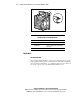
Figure 1-5. Hot-plug fan assembly LED
Table 1-4
Hot-Plug Fan Assembly LED Status
LED Indicator Status
No light Power is not applied to the fan.
Green light Power is applied to the fan and fan is
functional.
Amber Fan failure.
Media Bays
Hot-Plug Drive Bay
The Compaq ProLiant DL580 server supports one SCSI hard-drive cage that
can be populated with up to four 1-inch standard hot-plug Ultra 2 SCSI hard
drives, four Ultra 3 SCSI drives, or a combination of the two types. Drives of
any storage capacity can be used with ProLiant DL580 servers.