
ProLiant DL580 Setup and Installation Guide


E-4 Compaq ProLiant DL580 Server Setup and Installation Guide
Compaq Confidential – Need to Know Required
Writer: Cynthia Dresden Project: Compaq ProLiant DL580 Server Setup and Installation Guide Comments: Troubleshooting information by Susana
Weinstein Salazar
Part Number: 159213-003 File Name: m-appe Switch Settings.doc Last Saved On: 4/5/01 2:38 PM
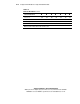
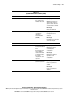
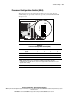
Table E-1
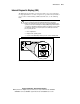
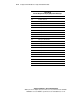
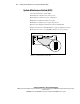
System Maintenance Switch (SW1)
continued
Position Default Function Description Settings
6 Off Maintenance Invalidates
nonvolatile RAM
(NVRAM)
configuration
information.
Open (off)
NVRAM is valid.
Closed (on)
NVRAM is invalid, and
configuration is lost.
CAUTION: When maintenance mode is turned on (the maintenance switch is set to On/Closed) and
the system is powered up, nonvolatile RAM (NVRAM) configuration is invalidated.
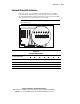
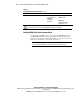
Enabling ROMPaq Disaster Recovery Mode
A corrupted system ROM requires you to recreate the ROM BIOS by using
the ROM flash utility. This can be accomplished only when the system is in
disaster recovery mode. Set configuration switches 1, 4, 5, and 6 on the system
maintenance switch block to On to enable disaster mode.
IMPORTANT: Before enabling ROMPaq disaster recovery mode, refer to the Compaq
Servers Troubleshooting Guide for complete instructions on disaster recovery.