
ProLiant DL580 Setup and Installation Guide


LED Indicators D-15
Compaq Confidential – Need to Know Required
Writer: Cynthia Dresden Project: Compaq ProLiant DL580 Server Setup and Installation Guide Comments:
Part Number: 159213-003 File Name: l-appd LED Indicators.doc Last Saved On: 4/5/01 2:37 PM
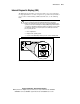
Interlock Status LED Indicators
Improperly seated components in the interlock chain will cause the LED
associated with the fault origination point to illuminate on the system board.
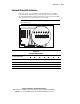
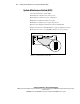
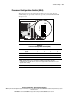
The following illustration and table identify the location of the interlock LED
indicators and the point of the hardware connection fault.
IMPORTANT: Compaq ProLiant DL580 servers are not equipped with chassis door or
access panel interlocks.
IL 0
IL 1
IL 2
IL 3
IL 4
IL 5
IL 6
1 2 3 4 5 6 7
Figure D-9. Interlock LED indicators on the system board
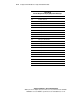
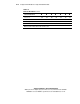
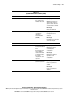
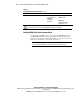
Table D-11
Interlock LED Indicators
Fault of Interlock Error
Memory board OnOnOnOnOnOnOn
Processor 1 Off On On On On On On
Processor 2 OffOffOnOnOnOnOn
Processor 3 Off Off Off On On On On
continued