
ProLiant DL580 Setup and Installation Guide


LED Indicators D-13
Compaq Confidential – Need to Know Required
Writer: Cynthia Dresden Project: Compaq ProLiant DL580 Server Setup and Installation Guide Comments:
Part Number: 159213-003 File Name: l-appd LED Indicators.doc Last Saved On: 4/5/01 2:37 PM
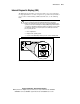
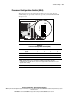
Internal Diagnostic Display (IDD)
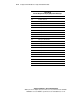
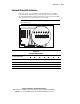
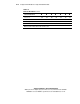
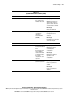
The IDD indicates the failure of a memory module or processor. It displays a
two-digit alphanumeric code that corresponds to a specific memory module or
processor. For an understanding of IDD status indicators, see the following
table.
CAUTION: Opening the access panel for an extended period of time when the
server is on interferes with proper airflow and will cause a temperature
violation. It is appropriate to open the server access panel briefly during server
operation to view the Internal Diagnostic Display (IDD) during problem diagnosis
or to replace a redundant hot-plug power supply or hot-plug fan. If you feel that
you will need to keep the access panel open for an extended period of time,
prior to opening the unit:
1. Close all applications.
2. Bring down the operating system.
3. Press the Power On/Standby switch to place the server in standby mode.
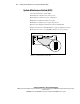
Figure D-8. Internal Diagnostic Display (IDD)