
ProLiant DL580 Setup and Installation Guide

1-6 Compaq ProLiant DL580 Server Setup and Installation Guide
Compaq Confidential – Need to Know Required
Writer: Cynthia Dresden Project: Compaq ProLiant DL580 Server Setup and Installation Guide Comments:
Part Number: 159213-003 File Name: b-ch1 Server Features.doc Last Saved On: 4/9/01 5:05 PM
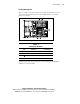
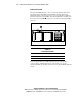
Front Panel Fan LED
Front panel fan LEDs display a color-coded message about the status of the
fans. The front panel fan LED is the third LED to the right of the Power
On/Standby switch on the front of the server. See Appendix D for additional
information about front panel LEDs. The following illustration and table show
the location of the fan LED
and provide a description of hot-plug fan LED
messages.
1
Figure 1-3. Front panel fan LED
Table 1-2
Front Panel Fan LED
LED Color Description
Green All fans are operational.
Amber One or more fans have failed.
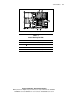
Each hot-plug fan unit has an LED running from the hot-plug fan I/O
connector that is visible through the top of the fan unit cover. See the
following illustrations and tables for locations of hot-plug fan LEDs within the
chassis.