
ProLiant DL580 Setup and Installation Guide

LED Indicators D-7
Compaq Confidential – Need to Know Required
Writer: Cynthia Dresden Project: Compaq ProLiant DL580 Server Setup and Installation Guide Comments:
Part Number: 159213-003 File Name: l-appd LED Indicators.doc Last Saved On: 4/5/01 2:37 PM
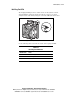
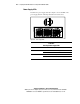
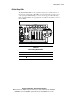
Hot-Plug Fan LEDs
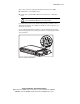
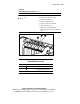
The hot-plug fan LED provides a visual reference for the status of each fan.
View the LED by opening the primary hot-plug door on the access panel.
Verify the status of the fans by noting the color of the LED at the fan location.
Figure D-3. Hot-plug fan assembly LED location
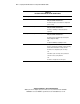
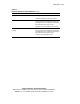
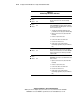
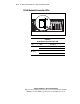
Use the following table to determine the status of the hot-plug fan LED.
Table D-4
Hot-Plug Fan LED Status
LED Indication Status
Off Power is not applied to the fan
Green Power is applied to the fan and the fan is functional
Amber Fan failure