
ProLiant DL580 Setup and Installation Guide

D-6 Compaq ProLiant DL580 Server Setup and Installation Guide
Compaq Confidential – Need to Know Required
Writer: Cynthia Dresden Project: Compaq ProLiant DL580 Server Setup and Installation Guide Comments:
Part Number: 159213-003 File Name: l-appd LED Indicators.doc Last Saved On: 4/5/01 2:37 PM
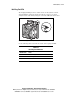
Hot-Plug Fan LEDs
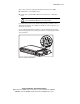
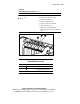
In Compaq ProLiant DL580 servers, the eight hot-plug system fans are
installed as dual-fan assemblies. Each assembly is monitored by an LED
attached to the system board and read from the light see at the top of the
assembly inside the chassis. These LEDs indicate whether or not each dual-fan
unit is active.
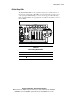
There is also an LED indicating overall status of hot-plug system fans on the
front panel of the server. See “Front Panel LEDs” for a comprehensive guide
to monitoring system fan activity by understanding messages on the front
panel fan LED.
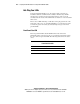
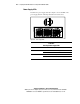
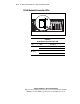
Front Panel Fan LED
The front panel fan LED is the third LED from the left of the Power
On/Standby switch on the front of the server. Determine fan status by noting
the color of the front panel fan LED. The following table defines the status
colors.
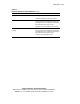
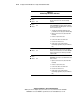
Table D-3
Front Panel Fan LED
LED Status Description
Amber/blinking One or more fans have failed
Off Fans OK