
ProLiant DL580 Setup and Installation Guide

D-4 Compaq ProLiant DL580 Server Setup and Installation Guide
Compaq Confidential – Need to Know Required
Writer: Cynthia Dresden Project: Compaq ProLiant DL580 Server Setup and Installation Guide Comments:
Part Number: 159213-003 File Name: l-appd LED Indicators.doc Last Saved On: 4/5/01 2:37 PM
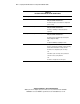
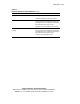
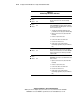
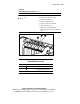
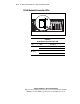
Table D-2
Hard Drive LED Indicator Status Combinations
Activity Online Fault
Means
On Off Off
Do not remove the drive. Removing a drive during
this process will cause data loss.
The drive is being accessed and is not configured as
part of an array.
On Flashing Off
Do not remove the drive. Removing a drive during
this process will cause data loss.
The drive is rebuilding or undergoing capacity
expansion.
Flashing Flashing Flashing
Do not remove the drive. Removing a drive during
this process will cause data loss.
The drive is part of an array being selected by the
Array Configuration Utility.
-Or-
The Options ROMPaq is upgrading the drive.
Off Off Off OK to replace the drive online if a predictive failure
alert is received (see the following section for details),
and the drive is attached to an array controller.
The drive is not configured as part of an array.
-Or-
If this drive is part of an array, then a powered-on
controller is not accessing the drive.
-Or-
The drive is configured as an online spare.
continued