
ProLiant DL580 Setup and Installation Guide

Server Features 1-5
Compaq Confidential – Need to Know Required
Writer: Cynthia Dresden Project: Compaq ProLiant DL580 Server Setup and Installation Guide Comments:
Part Number: 159213-003 File Name: b-ch1 Server Features.doc Last Saved On: 4/9/01 5:05 PM
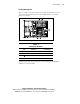
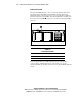
Locating Hot-Plug Fans
There are a total of eight fans mounted as four duplex fan units in the server as
shown in the following illustration. Use the fan LED indicators to verify the
activity on each unit.
5 6
3
7 8
1
2
1
3 4
2
4
Figure 1-2. Hot-plug fan locations
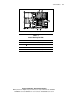
Table 1-1
Hot-Plug Fan Locations
Item Component Fan Identifiers
Fan Assembly A Fans 1 and 2
Fan Assembly B Fans 3 and 4
Fan Assembly C Fans 5 and 6
Fan Assembly D Fans 7 and 8
Verify the status of the fans by noting the color and activity of the LED light
mounted on each fan assembly.