
ProLiant DL580 Setup and Installation Guide

C-10 Compaq ProLiant DL580 Server Setup and Installation Guide
Compaq Confidential – Need to Know Required
Writer: Cynthia Dresden Project: Compaq ProLiant DL580 Server Setup and Installation Guide Comments: Troubleshooting information by Susana
Weinstein Salazar
Part Number: 159213-003 File Name: k-appc Troubleshooting.doc Last Saved On: 4/5/01 2:37 PM
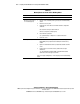
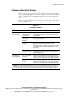
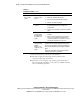
Table C-7
Installation Problems
continued
Problem Possible Cause Possible Solution
Server cannot
load operating
system.
Required operating
system step was
missed.
1. Note the phase at which the operating system failed.
2. Remove any loaded operating system.
3. Refer to your operating system documentation.
4. Install the operating system again.
Installation problem
occurred.
1. Refer to your operating system documentation and to
the SmartStart Release Notes, located on the
SmartStart CD.
2. Use the server setup utility to troubleshoot installation
failure.
Problem
encountered with
the hardware that
was added to the
system.
1. Refer to the documentation provided with the
hardware.
2. Run the server setup utility to determine whether
drives are properly attached to the primary boot
controller. See Chapter 5 for instructions on correct
SCSI cabling configurations for your server.
Problem
encountered with
hardware
added to a new
configure-to-order
system.
Complete the factory-installed operating system software
installation prior to adding new hardware to the system.
Be sure you are following the instructions provided in the
Factory-Installed Operating System Software Installation
Guide.
Remove the new hardware and complete the software
installation. Reinstall the new hardware.
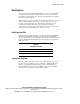
Refer to the Compaq Servers Troubleshooting Guide for:
■ Information required for diagnosing software problems and for
contacting Compaq support technicians.
■ Instructions on how to upgrade your operating system and its drivers.
The guide also tells you which recovery options are available and offers
advice on minimizing downtime.