
ProLiant DL580 Setup and Installation Guide

C-4 Compaq ProLiant DL580 Server Setup and Installation Guide
Compaq Confidential – Need to Know Required
Writer: Cynthia Dresden Project: Compaq ProLiant DL580 Server Setup and Installation Guide Comments: Troubleshooting information by Susana
Weinstein Salazar
Part Number: 159213-003 File Name: k-appc Troubleshooting.doc Last Saved On: 4/5/01 2:37 PM
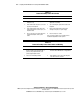
Table C-1
Diagnosis Steps
Question Action
Question 1: Are any front panel system status
LEDs on?
If no, go to Table C-2.
If yes, continue to Question 2.
Question 2: Is the Power On/Standby status LED
green or amber?
If amber and on, go to Table C-3.
If amber and blinking, continue to Question 3.
If green, continue to Question 4.
Question 3: Is the amber Power On/Standby LED
blinking?
If yes, go to Table C-4.
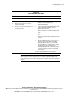
Question 4: Does the server have video? If no, go to Table C-5.
If yes, video is available for diagnosis. Determine the
next action by observing POST progress and error
messages. Refer to “POST Error Messages” in the
Compaq Servers Troubleshooting Guide for a complete
description of each POST error message.
Question 5: Is the memory/processor status LED
blinking amber?
If yes, go to Table C-6.
WARNING: To reduce the risk of electric shock or damage to the equipment:
■ Do not disable the power cord grounding plug. The grounding plug is an
important safety feature.
■ Plug the power cord into a grounded (earthed) electrical outlet that is
easily accessible at all times.
■ Install the power supply before connecting the power cord to the power
supply.
■ Unplug the power cord before removing the power supply from the server.
■ If the system has multiple power supplies, disconnect power from the
system by unplugging all power cords from the power supplies.