
ProLiant DL580 Setup and Installation Guide
PCI Hot Plug Technology 6-11
Compaq Confidential – Need to Know Required
Writer: Cynthia Dresden Project: Compaq ProLiant DL580 Server Setup and Installation Guide Comments:
Part Number: 159213-003 File Name: g-ch6 Hot-Plug Technology.doc Last Saved On: 4/5/01 2:01 PM
Performing PCI Hot Plug Actions
The Compaq PCI Hot Plug and the intraNetWarePCI Hot Plug application
work together to allow the following PCI Hot Plug actions:
■ Hot removal of adapters
You can manually shut down and permanently remove an adapter,
regardless of whether it is working or has failed.
■ Hot replacement of adapters
This allows you to replace a failed adapter with an identical adapter.
This command applies power to and configures the slot.
■ View slot detail information
This allows you to view detailed information about each PCI slot.
Viewing Slot Detail Information
1. From the Main menu, highlight the slot and adapter information to be
viewed. Press Enter.
2. Select Slot Detail Information from the Slot Options menu.
Removing an Adapter
1. From the Main menu, highlight the slot and adapter to be removed.
2. Press Enter to go to the Slot Options menu.
3. Use the arrow keys to highlight Remove Adapter and press Enter.
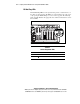
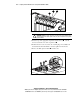
NCMCON then processes the remove request. Once the slot has a status
of POWERED Off and the green LED is no longer lit, you can
physically remove the adapter by opening the slot release lever and
taking the adapter out of the slot. NCMCON updates the status of the
slot.
Replacing an Adapter
Use the following steps to remove an adapter in a Novell intraNetWare
environment:
1. Use the Remove command to remove the adapter from the slot. See
“Removing an Adapter.”
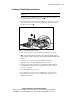
2. You can now physically replace the failed adapter by putting the new
adapter in the slot and closing the slot release lever.