
ProLiant DL580 Setup and Installation Guide

6-8 Compaq ProLiant DL580 Server Setup and Installation Guide
Compaq Confidential – Need to Know Required
Writer: Cynthia Dresden Project: Compaq ProLiant DL580 Server Setup and Installation Guide Comments:
Part Number: 159213-003 File Name: g-ch6 Hot-Plug Technology.doc Last Saved On: 4/5/01 2:01 PM
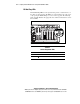
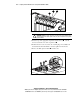
3
1
2
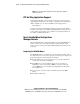
Figure 6-3. PCI Hot Plug button and LED indicators
CAUTION: DO NOT open the slot release lever unless the green LED indicator is
off. Releasing the lever before power is off can cause a complete loss of system
power and data.
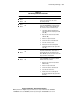
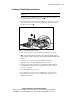
5. Press the top of the appropriate expansion slot release lever and roll
the lever toward the rear of the expansion slot
.
6. Hold the board at each end, release the retaining clip, and carefully rock
the board back and forth until the connectors pull free from the slot.
7. Remove the PCI expansion board from the slot.
3
1
2
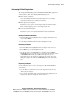
Figure 6-4. Removing the PCI Hot Plug expansion board