
ProLiant DL580 Setup and Installation Guide

PCI Hot Plug Technology 6-7
Compaq Confidential – Need to Know Required
Writer: Cynthia Dresden Project: Compaq ProLiant DL580 Server Setup and Installation Guide Comments:
Part Number: 159213-003 File Name: g-ch6 Hot-Plug Technology.doc Last Saved On: 4/5/01 2:01 PM
Removing a PCI Hot Plug Expansion Board
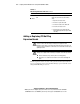
WARNING: Reduce the risk of personal injury from hot surfaces by allowing all
internal system components to cool before working with them.
To remove a PCI expansion board, complete the following procedure:
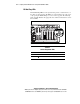
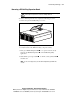
1. Unlock and open the PCI Hot Plug access door.
Figure 6-2. Opening the PCI Hot Plug access door
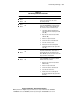
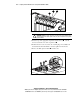
2. Verify the status of the LEDs indicating component activity.
3. If the green PCI Hot Plug slot LED is on, power down the slot by
using the slot PCI Hot Plug button
or the PCI Hot Plug utility
application.
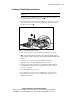
4. Wait until the power (green) LED is off. The activity (amber) LED
should be off.
NOTE: To cancel a hot-plug action, press the PCI Hot Plug button again within five
seconds.