
ProLiant DL580 Setup and Installation Guide

6-2 Compaq ProLiant DL580 Server Setup and Installation Guide
Compaq Confidential – Need to Know Required
Writer: Cynthia Dresden Project: Compaq ProLiant DL580 Server Setup and Installation Guide Comments:
Part Number: 159213-003 File Name: g-ch6 Hot-Plug Technology.doc Last Saved On: 4/5/01 2:01 PM
PCI Hot Plug Capability
PCI Hot Plug devices can be both hot-plug and non-hot-plug compatible,
although most components are usually identified as either one or the other. In
fact, all system components are said to be either hot-plug aware or
non-hot-plug aware. The following requirements must be met in order for
complete PCI Hot Plug capability to exist:
■ PCI Hot Plug system hardware must be installed and available in your
server.
■ An operating system with PCI Hot Plug support must be installed.
Operating systems with full PCI Hot Plug support include Microsoft
Windows NT and Windows 2000, Novell NetWare, and SCO UNIX.
■ PCI Hot Plug device drivers must be installed. Device drivers can be
provided by operating system vendors, the Compaq SmartStart and
Support Software CD, or individual hardware vendors.
WARNING: All three hot-plug requirements must be met in order for your
system to be fully PCI Hot Plug capable. Attempting to perform a PCI Hot Plug
operation without complete PCI Hot Plug capability will cause an immediate
system crash.
IMPORTANT: Before adding or removing any PCI Hot Plug devices, be sure to remove
power to the slot using the PCI Hot Plug application. Failure to do so can result in critical
errors. Read the PCI Hot Plug LED activity indicators next to each expansion slot to identify
the status of each slot.
With PCI Hot Plug capabilities, it is possible to remove and replace PCI
adapters without powering down the server. There is, however, a proper way
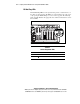
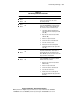
to manage removal and replacement. See the illustration and table in the
section on PCI Hot Plug LEDs later in this chapter for additional information.
Plan the SCSI configuration before installing a SCSI controller board. Consult
the following sources of information when planning the SCSI installation.
■ Documentation provided with the SCSI drives for installation
information and controller configuration.
■ Information about the compatibility of SCSI controllers with SCSI
drives in the Compaq ProLiant DL580 from the Compaq website:
www.compaq.com/products/servers
■ Information about SCSI cabling in Chapter 5, “Cabling Guidelines.”
■ Information about using the Compaq System Configuration Utility to set
up a SCSI drive array in Chapter 7, “Server Configuration and Utilities.”