
Compaq Parallel Database Cluster Model PDC/O2000 for Oracle8i and Windows 2000 Administrator Guide


Contents vii
Compaq Confidential – Need to Know Required
Writer: John Blackburn Project: Parallel Database Cluster Model PDC/02000 for Oracle8i and Windows 2000 Comments:
Part Number: 225082-002 File Name: a-frnt.doc Last Saved On: 6/13/01 3:47 PM
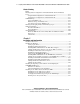
Installing Compaq OSDs ....................................................................................... 5-30
Verifying Cluster Communications................................................................ 5-31
Mounting Remote Drives and Verifying Administrator Privileges ................ 5-32
Installing the Ethernet OSDs .......................................................................... 5-33
Installing Oracle Software ..................................................................................... 5-44
Configuring Oracle Software................................................................................. 5-45
Installing Object Link Manager............................................................................. 5-45
Additional Notes on Configuring Oracle Software ........................................ 5-46
Verifying the Hardware and Software Installation ................................................ 5-47
Cluster Communications ................................................................................ 5-47
Access to Shared Storage from All Nodes...................................................... 5-47
OSDs .............................................................................................................. 5-47
Other Verification Tasks ................................................................................ 5-48
Power Distribution and Power Sequencing Guidelines ......................................... 5-48
Server Power Distribution .............................................................................. 5-49
RA4000/RA4100 Array Power Distribution .................................................. 5-49
Power Sequencing .......................................................................................... 5-50
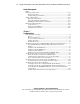
Chapter 6
Cluster Management
Cluster Management Concepts ................................................................................ 6-2
Powering Off a Node Without Interrupting Cluster Services ........................... 6-2
Managing a Cluster in a Degraded Condition................................................... 6-2
Managing Network Clients Connected to a Cluster ......................................... 6-3
Cluster Events................................................................................................... 6-3
Management Applications ....................................................................................... 6-4
Monitoring Server and Network Hardware ...................................................... 6-4
Managing Shared Drives .................................................................................. 6-5
Monitoring Redundant Fibre Channel Fabrics ................................................. 6-5
Monitoring Redundant Fibre Channel Arbitrated Loops.................................. 6-6
Monitoring the Database .................................................................................. 6-7
Remotely Managing a Cluster .......................................................................... 6-7
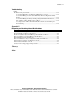
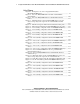
Software Maintenance for Oracle8i......................................................................... 6-8
Deinstalling the OSDs ...................................................................................... 6-8
Upgrading Oracle8i Server............................................................................. 6-11
Upgrading the OSDs....................................................................................... 6-11
Deinstalling a Partial OSD Installation........................................................... 6-13
Upgrading Oracle8i Server............................................................................. 6-14
Managing Changes to Shared Storage Components .............................................. 6-14
Replacing a Failed Disk.................................................................................. 6-14
Adding Disk Drives to Increase Storage Capacity ......................................... 6-15
Adding an RA4000/RA4100 Array................................................................ 6-15
Replacing a Failed Fibre Host Adapter........................................................... 6-16