
Compaq Parallel Database Cluster Model PDC/O2000 for Oracle8i and Windows 2000 Administrator Guide
Diagnosing and Resolving Shared Disk Problems A-7
Compaq Confidential – Need to Know Required
Writer: John Blackburn Project: Compaq Parallel Database Cluster Model PDC/O2000 for Oracle8i and Windows 2000 Administrator Guide Comments:
Part Number: 225082-002 File Name: i-appa Diagnosing Shared Storage.doc Last Saved On: 6/13/01 10:31 AM
Perform Cluster Hardware Checks
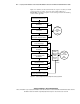
Validate the cluster hardware by performing these steps:
1. Determine whether or not hardware errors or communications transport
failures might be causing the problem. Use the Event Viewer to verify
that no hardware errors or transport problems exist. Check the event log
for disk I/O error messages or indications of problems with the
communications transport.
2. Determine whether or not the Compaq servers support the physical
SCSI disks that are installed in the RA4000/RA4100 Arrays. Check the
event log for disk I/O error messages or indications of problems with the
communications transport.
3. Verify that the indicator lights on the Fibre Host Adapters, Compaq
StorageWorks Storage Hubs, Compaq StorageWorks FA-AL Switches,
or Compaq StorageWorks Fibre Channel SAN Switches, and RA4000
Array Controllers are all in the correct state.
4. Verify that the Gigabit Interface Converter-Shortwave (GBIA-SW)
modules are all the correct brand or model type and are properly seated
in the Fibre Host Adapters, Fibre Channel SAN Switches, Storage Hubs,
or FA-AL Switches, and RA4000 Array Controllers.
5. Inspect all Fibre Channel cables to verify that they are in good condition
and have no breaks or excessive bends.
6. Verify that the Fibre Channel cables are properly connected to the
GBIA-SW modules in the Fibre Host Adapters, Fibre Channel SAN
Switches, Storage Hubs, or FA-AL Switches, and RA4000 Array
Controllers. For details on how to connect the GBIA-SW modules and
the Fibre Channel cables, refer to the Compaq StorageWorks RAID
Array 4000 User Guide or the Compaq StorageWorks RAID Array 4100
User Guide.
7. Verify that all Fibre Host Adapters, RA4000 Array Controllers, and
RA4000/RA4100 Array shared disk modules are properly installed and
seated in their receptacles.