
Compaq Parallel Database Cluster Model PDC/O2000 for Oracle8i and Windows 2000 Administrator Guide



6-12 Compaq Parallel Database Cluster Model PDC/O2000 for Oracle8i and Windows 2000 Administrator Guide
Compaq Confidential – Need to Know Required
Writer: John Blackburn Project: Compaq Parallel Database Cluster Model PDC/O2000 for Oracle8i and Windows 2000 Administrator Guide Comments:
Part Number: 225082-002 File Name: g-ch6 Cluster Management.doc Last Saved On: 6/13/01 10:29 AM
Upgrading the Ethernet OSDs
To upgrade the Ethernet OSDs:
1. Insert the CD containing the new revision of the OSDs into the
CD-ROM drive on the primary node. (This is the node that was used for
the previous installation of the OSDs.)
The Oracle Universal Installer window is displayed.
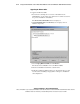
2. Click Deinstall Products. The Inventory screen displays a list of
installed components.
3. Select Compaq Ethernet OSDs and click Remove.
The Oracle Universal Installer removes all Ethernet OSDs.
4. After the deinstallation has finished, restart all nodes.
5. Install the new Ethernet OSDs from the new by following the procedure
described under “Installing Compaq OSDs” in Chapter 5, “Installation
and Configuration.”