
Compaq Parallel Database Cluster Model PDC/O2000 for Oracle8i and Windows 2000 Administrator Guide


6-8 Compaq Parallel Database Cluster Model PDC/O2000 for Oracle8i and Windows 2000 Administrator Guide
Compaq Confidential – Need to Know Required
Writer: John Blackburn Project: Compaq Parallel Database Cluster Model PDC/O2000 for Oracle8i and Windows 2000 Administrator Guide Comments:
Part Number: 225082-002 File Name: g-ch6 Cluster Management.doc Last Saved On: 6/13/01 10:29 AM
Before installing Compaq Insight Manager, Compaq Insight Manager XE, or
Oracle8i Enterprise Manager, it is recommended that you read through the
corresponding documentation to determine how to set up and configure each
of these programs to run remotely.
Software Maintenance for Oracle8i
Deinstalling the OSDs
At some point, you might want to deinstall the operating system dependent
modules (OSDs). Some example situations are:
■ When a node is being permanently removed from the cluster
■ When a node is being replaced
■ When a node is being added to the cluster
■ When the OSDs are being upgraded to a newer revision level
Use Oracle Universal Installer to deinstall the OSDs.
IMPORTANT: The Oracle Universal Installer removes the OSDs from all cluster nodes. To
properly maintain the cluster, the Oracle Universal Installer cannot remove the OSDs from
individual nodes. After the OSDs are deinstalled, the cluster is disbanded and cannot run
until the OSDs are reinstalled on all the nodes.
Be sure to shut down the Oracle instance on all nodes and stop the Oracle
services running on all nodes prior to removing the OSDs.
To deinstall the OSDs:
1. Log in as a user who has administrator privileges on all nodes in the
cluster.
2. Insert the Compaq Parallel Database Cluster Clustering Software for
Oracle8i on Microsoft Windows 2000 CD into the CD-ROM drive of
the primary node. This is the node where the OSDs were installed
originally.
IMPORTANT: To deinstall the OSDs, you must run the Oracle Universal Installer from the
same node where the OSDs were installed.
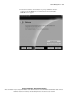
3. If autorun is enabled, the Oracle Universal Installer Welcome screen
appears.