
Compaq Parallel Database Cluster Model PDC/O2000 for Oracle8i and Windows 2000 Administrator Guide




Installation and Configuration 5-49
Compaq Confidential – Need to Know Required
Writer: Carol Tatick Project: Compaq Parallel Database Cluster Model PDC/O2000 for Oracle8i and Windows 2000 Administrator Guide Comments:
Part Number: 225082-002 File Name: f-ch5 Installation and Configuration.doc Last Saved On: 6/13/01 10:27 AM
Server Power Distribution
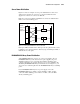
Figure 5-9 shows an example of server power distribution for a three-node
cluster. Power supply #1 of each server is connected to PDU #1. Power
supply #2 of each server is connected to PDU #2.
PDU #1 is connected to UPS #1, and PDU #2 is connected to UPS #2. Each
UPS is connected to building power.
Building
Power
UPS #1PDU #1Proliant Servers
Power
Supply #1
Power
Supply #2
PDU #2
UPS #2
Figure 5-9. Server power distribution in a three-node cluster
Having two PDUs and UPSs in the cluster provides two paths from the servers
to building power and means that the cluster stays up and running if a PDU or
UPS fails in one of the paths.
RA4000/RA4100 Array Power Distribution
An RA4000/RA4100 Array can have one or two power supplies. If each
RA4000/RA4100 Array in the cluster has two power supplies, the power
distribution (with respect to connecting them to PDUs and UPSs) can be
configured similarly to the example shown for server power distribution. By
substituting RA4000/RA4100 Arrays for ProLiant servers in Figure 5-9, you
can provide two redundant paths from the RA4000/RA4100 Arrays to building
power.
If each RA4000/RA4100 Array has one power supply, connect the
RA4000/RA4100 Array to a PDU, connect the PDU to a UPS, and then
connect the UPS to building power. If there is no UPS, connect the PDU
directly to building power.