
Compaq Parallel Database Cluster Model PDC/O2000 for Oracle8i and Windows 2000 Administrator Guide


5-14 Compaq Parallel Database Cluster Model PDC/O2000 for Oracle8i and Windows 2000 Administrator Guide
Compaq Confidential – Need to Know Required
Writer: Carol Tatick Project: Compaq Parallel Database Cluster Model PDC/O2000 for Oracle8i and Windows 2000 Administrator Guide Comments:
Part Number: 225082-002 File Name: f-ch5 Installation and Configuration.doc Last Saved On: 6/13/01 10:27 AM
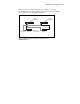
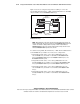
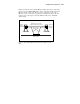
Figure 5-5 shows an example of using method 2 cabling to connect two
Storage Hubs, FC-AL Switches, or Fibre Channel SAN Switches to RA4000
Array Controllers in two RA4000/RA4100 Arrays.
RA4000/4100
Array #1
RA4000/4100
Array #3
RA4000/4100
Array #4
RA4000/4100
Array #2
Standby
Array Controller
Active
Array Controller
Storage
Hub/Switch #1
Storage
Hub/Switch #2
Figure 5-5. Method 2: cabling an active/active configuration with two
RA4000/RA4100 Arrays
NOTE: When defining the active array controllers as instructed later in this chapter, for
method 1 cabling make the top array controller in each RA4000/RA4100 Array the active
controller. For method 2 cabling, make the top array controller in odd-numbered
RA4000/RA4100 Arrays the active controller; make the bottom array controller in even-
numbered RA4000/RA4100 Arrays the active controller.
To cable the Storage Hubs, FC-AL Switches, or Fibre Channel SAN Switches
to the RA4000 Array Controllers in an active/active configuration:
1. Using Fibre Channel cables, connect Storage Hub/Switch #1 to the
active RA4000 Array Controller in odd-numbered RA4000/RA4100
Arrays (RA4000/RA4100 Array #1, RA4000/RA4100 Array #3, and
RA4000/RA4100 Array #5).
2. Using Fibre Channel cables, connect Storage Hub/Switch #1 to the
standby RA4000 Array Controller in even-numbered RA4000/RA4100
Arrays (RA4000/RA4100 Array #2 and RA4000/RA4100 Array #4).
3. Using Fibre Channel cables, connect Storage Hub/Switch #2 to the
active RA4000 Array Controller in even-numbered RA4000/RA4100
Arrays.
4. Using Fibre Channel cables, connect Storage Hub/Switch #2 to the
standby RA4000 Array Controller in odd-numbered RA4000/RA4100
Arrays.