
Compaq Parallel Database Cluster Model PDC/O2000 for Oracle8i and Windows 2000 Administrator Guide

Installation and Configuration 5-11
Compaq Confidential – Need to Know Required
Writer: Carol Tatick Project: Compaq Parallel Database Cluster Model PDC/O2000 for Oracle8i and Windows 2000 Administrator Guide Comments:
Part Number: 225082-002 File Name: f-ch5 Installation and Configuration.doc Last Saved On: 6/13/01 10:27 AM
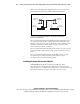
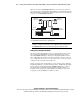
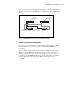
Figure 5-3 shows two Storage Hubs, FC-AL Switches, or Fibre Channel SAN
Switches connected to the RA4000 Array Controllers in two RA4000/RA4100
Arrays.
RA4000/4100
Array #1
RA4000/4100
Array #2
Standby
Array Controller
Active
Array Controller
Storage
Hub/Switch #1
Storage
Hub/Switch #2
Figure 5-3. Cabling Storage Hubs, FC-AL Switches, or Fibre Channel SAN
Switches to RA4000 Array Controllers in an active/standby configuration
Cabling an Active/Active Configuration
In an active/active configuration, each Storage Hub, FC-AL Switch, or Fibre
Channel SAN Switch is connected to active and standby RA4000 Array
Controllers.
You can cable the Storage Hubs, FC-AL Switches, or Fibre Channel SAN
Switches to the RA4000 Array Controllers using one of two methods. The
differences between the two methods are the location of the active array
controllers in the RA4000/RA4100 Arrays and the configuration of the Fibre
Channel cables that connect the Storage Hubs or switches to the array
controllers.