
Compaq Parallel Database Cluster Model PDC/O2000 for Oracle8i and Windows 2000 Administrator Guide

5-8 Compaq Parallel Database Cluster Model PDC/O2000 for Oracle8i and Windows 2000 Administrator Guide
Compaq Confidential – Need to Know Required
Writer: Carol Tatick Project: Compaq Parallel Database Cluster Model PDC/O2000 for Oracle8i and Windows 2000 Administrator Guide Comments:
Part Number: 225082-002 File Name: f-ch5 Installation and Configuration.doc Last Saved On: 6/13/01 10:27 AM
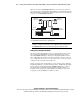
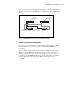
Figure 5-2 shows two RA4000/RA4100 Arrays connected to two clustered
servers through one redundant Fibre Channel Fabric or redundant FC-AL. The
Fibre Channel Fabric or FC-AL is redundant because there are two paths from
each node to each RA4000/RA4100 Array.
Fibre Host
Adapters (2)
RA4000/4100 Array #1
RA4000/4100 Array #2
Storage
Hub/Switch #1
Node 1 Node 2
Storage
Hub/Switch #2
Fibre Host
Adapters (2)
Figure 5-2. RA4000/RA4100 Arrays connected to clustered servers through
one redundant Fibre Channel Fabric or redundant FC-AL
IMPORTANT: Although you can configure the RA4000/RA4100 Array with a single drive
installed, it is strongly recommended for cluster configuration that all shared drives be in
the RA4000/RA4100 Array before running the Compaq Array Configuration Utility.
Compaq Array Configuration Utility
The Array Configuration Utility is used to set up the hardware aspects of any
drives attached to a RA4000 Array Controller, including the drives in the
shared RA4000/RA4100 Arrays. The Array Configuration Utility stores the
drive configuration information on the drives themselves; therefore, after you
have configured the drives from one of the cluster nodes, it is not necessary to
configure the drives from the other cluster node.
Before you run the Array Configuration to set up your drive arrays during the
SmartStart installation, review the instructions in the “Installing the Operating
System Software and Configuring the RA4000/RA4100 Arrays” section of
this chapter. These instructions include clustering information that is not
included in the Compaq StorageWorks RAID Array 4000 User Guide or the
Compaq StorageWorks RAID Array 4100 User Guide.