
Compaq Parallel Database Cluster Model PDC/O2000 for Oracle8i and Windows 2000 Administrator Guide

5-6 Compaq Parallel Database Cluster Model PDC/O2000 for Oracle8i and Windows 2000 Administrator Guide
Compaq Confidential – Need to Know Required
Writer: Carol Tatick Project: Compaq Parallel Database Cluster Model PDC/O2000 for Oracle8i and Windows 2000 Administrator Guide Comments:
Part Number: 225082-002 File Name: f-ch5 Installation and Configuration.doc Last Saved On: 6/13/01 10:27 AM
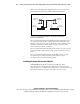
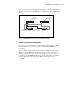
Figure 5-1 shows the Fibre Host Adapters in two servers connected to two
Storage Hubs, FC-AL Switches, or Fibre Channel SAN Switches.
Fibre Host
Adapters (2)
Storage
Hub/Switch #1
Node 1 Node 2
Storage
Hub/Switch #2
Fibre Host
Adapters (2)
Figure 5-1. Connecting Fibre Host Adapters to Storage Hubs, FC-AL Switches,
or Fibre Channel SAN Switches
For more detailed information about the Fibre Channel SAN Switch, refer to
the Compaq StorageWorks Fibre Channel SAN Switch 8 Installation and
Hardware Guide, the Compaq StorageWorks Fibre Channel SAN Switch 16
Installation and Hardware Guide, and the Compaq StorageWorks Fibre
Channel SAN Switch Management Guide.
For more detailed information about the FC-AL Switch, refer to the Compaq
StorageWorks Fibre Channel Arbitrated Loop Switch (FC-AL Switch) User
Guide.
For more detailed information about the Storage Hub, refer the Compaq
StorageWorks Storage Hub 7 Installation Guide and the Compaq
StorageWorks Storage Hub 12 Installation Guide.
Installing the Cluster Interconnect Adapters
A PDC/O2000 running Oracle8i software uses an Ethernet cluster
interconnect. Both redundant and non-redundant cluster interconnects are
supported. However, a redundant cluster interconnect is recommended because
if provides fault tolerance along the entire cluster interconnect path.