
HP ProLiant DL560 Server High Density Deployment





hp ProLiant DL560 server high-density deployment white paper
21
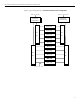
table 8: device configuration for an in-rack local IP console
device or cable 47U rack 42U rack 36U rack
ProLiant DL560 Servers 23 20 17
KVM IP Console Switches 1 1 1
Interface adapters 22 20 17
UTP CAT5 cables for KVM access 22 20 17
Expansion modules 4-16 3-16 3-16
TFT5600 RKM (integrated monitor/keyboard) 1 1 1
Each server deployed in a fully populated rack with an in-rack IP console
management system requires the following accessories for successful
deployment and operation:
• Interface adapter
• UTP CAT5 cable [1.8 m (6 ft) cables for sliding rail solutions]
• Rack Rail kit (standard rack rails and cable management arm, telco rack
solution, or round-hole rack rails and cable management arm )
power
configuration
examples
The high/low voltage and dual-power supply capabilities of the ProLiant DL560
server makes it adaptable to a variety of power configurations. Each of the
following examples suggests a method of power distribution for a group of
servers mounted in a rack. These examples illustrate server power only and do
not take into account such accessories as KVM switches and display monitors
that are typically included in an installation.
high voltage
(208 VAC)
10-chassis
non-redundant
power
configuration
The following illustration (figure 7) shows a configuration where high voltage
(208 VAC) is distributed to ten server chassis in a rack that receives primary
power from one bus. A modular PDU that consists of a control unit and two
extension bars is connected to the primary power source. The control unit can
handle a maximum of 24 amps. Under normal operation, the power supply in
each server would support the full load of each server. Therefore under normal
conditions, the PDU would be loaded to approximately 24 amps, leaving no
headroom for auxiliary devices, such as KVM switches, a TFT display, and rack
monitoring devices. Refer to table 9 for power statistics for the high voltage
10-chassis configuration.