ProLiant DL385 Server User Guide
Manuals
Brands
HP Manuals
Server
HP ProLiant DL385 Server
31
32
33
34
35
36
37
38
39
40
Server operations
33
4.
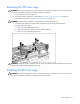
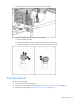
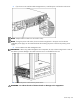
Remove the front fan bracket.
5.
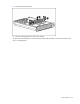
Remov
e all hot-plug fans from the front fan bracket.
To replace the front fan bracket, reverse the removal steps and press down
on the top of each fan to be
sure it is seated properly.
1
...
...
31
32
33
34
35
...
...
124