
Microsoft®Windows® Small Business Server 2008 Getting Started

Getting started 6
1.
Connect to the Internet.
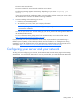
Configure your server and your network to connect to the Internet. To get started, click the Connect to
the Internet task.
2. Protect your data.
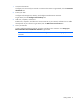
Configure and manage server backup, and configure Windows® Live OneCare.
To get started, click the Configure server backup task.
3. Add users, computers, and devices.
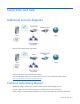
Enable users, computers, and devices to access resources on your network, and learn how to add a
shared printer to your network. To get started, click the Add a new user account task.
4. Grow your business.
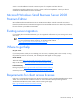
Create a professional-looking website, sell online, and attract new customers. Click Set up your
Microsoft® Office Live Small Business websites to get started.
NOTE: Microsoft® Office Live Small Business might not be available in all geographic
locations.