
HP ProLiant AMD-based 300-series G7 servers


13
include enough sensors to construct an accurate view of the thermal landscape within the server,
allowing the sensors and the fan control algorithm to determine if fan speeds need to be increased.
HP Dynamic Power Capping
Because Dynamic Power Capping lets you keep server power consumption below a power threshold
in real time, you can use it as a tool for planning and managing both electrical provisioning and
cooling requirements in the data center. You can electrically provision a PDU or a rack to less than
the full faceplate power rating of all the servers loaded and be assured it will not exceed the set limits.
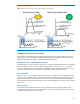
To implement Dynamic Power Capping, the iLO management processor works in conjunction with a
power microcontroller both to measure and to control power use. When enforcing the Dynamic Power
Cap, the power microcontroller keeps the processor’s performance and power use under the set cap.
This process is illustrated in Figure 4. You can set a Dynamic Power Cap for an individual server from
the iLO Advanced user interface. For multiple rack-mount servers, you can set the Dynamic Power
Caps from the power management module within HP Insight Control Environment.
HP Dynamic Power Capping is operating system independent and functions with all operating systems
and software applications. HP Dynamic Power Capping will continue to function even if the software
fails because HP designed the hardware to be independent of the OS.
Since Dynamic Power Capping can impact server performance if set too aggressively, HP
recommends that Dynamic Power Caps be set at values that match or exceed the highest observed
power consumption over a representative server workload sample.
For a more detailed explanation of HP Dynamic Power Capping, see the technology brief “HP Power
Capping and HP Dynamic Power Capping for ProLiant servers” available at
http://h20000.www2.hp.com/bc/docs/support/S
upportManual/c01549455/c01549455.pdf.