
Pedestal Kit Installation Guide, First Edition - HP Integrity rx2800 i2 and HP ProLiant DL380 G6 & DL385 G6 Servers
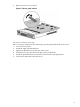

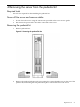
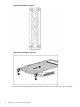
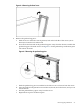




Figure 4-4 Removing the bezel cover
4. Remove the pedestal top piece.
a. With the server still in the vertical position, look at the left side of the server (server
bottom) to locate the lock release tab.
b. Press the lock release tab on the pedestal top piece away from the chassis to unlock the
pedestal top piece from the server. See Figure 4-5 for the pedestal top and bottom piece
lock release locations.
Figure 4-5 Removing the pedestal top piece
c. Slide the pedestal top piece toward the back of the server to release it from the server.
d. Once the pedestal component has moved about 1/4 inch, the lock releases, and you can
release the tab.
e. Pull the pedestal kit top piece away from the server.
f. Repeat these steps for the bottom piece.
Removing the pedestal kit 23