
HP ProLiant DL385 Generation 5 Server Maintenance and Service Guide



Removal and replacement procedures 62
6.
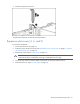
Remove the expansion slot cover.
To replace the component, reverse the removal procedure.
Expansion slot cover retainer (slots 1 and 2)
To remove the component:
1. Power down the server (on page 28).
2. Extend or remove the server from the rack ("Extend the server from the rack" on page 27, "Remove
the server from the rack" on page 29).
3. Remove the access panel ("Access panel" on page 30).
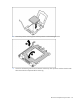
4. Open the expansion slot cover retainer.
5. Remove the expansion slot cover retainer.
To replace the component, reverse the removal procedure.